How It Works
Understanding the mechanics, technology, and purpose behind Spreadsearch
Understanding Bid-Ask Spreads
Options markets go through temporary periods where bid-ask spreads widen well beyond their usual range. These widenings can reflect shifts in liquidity, market activity, volatility, or the balance between buyers and sellers. Spreadsearch identifies and measures these conditions across contracts, expirations, and strikes, so they can be studied and compared systematically.
What Are Bid-Ask Spreads?
Listed options are typically quoted with a bid and an ask price. The bid is the highest price buyers are currently willing to pay. The ask is the lowest price sellers are currently willing to accept. The difference between the two is the bid-ask spread. In highly liquid options, spreads tend to be tight. In less liquid contracts, spreads can widen significantly, sometimes reflecting a temporary imbalance between supply and demand for that specific contract. Spreadsearch measures and surfaces precisely these situations.
Why Do Spreads Widen?
Spreads widen due to temporary liquidity imbalances, market maker repositioning, news events, or low trading volume. In each case, the width is compensation for a risk the liquidity provider carries. It is not a mispricing waiting to be collected. Wide spreads can appear across the options universe, from volatile individual names to energy and tech stocks, wherever liquidity temporarily thins. Spreadsearch scans for and measures these conditions in real time.
The Approach
Spreadsearch is built on two pillars:
Observation
Scan and measure bid-ask spreads across multiple tickers, expirations, and strike ranges at once. Sort results by any column.
Research
Observe and document spread dynamics across tickers, expiries, and market conditions. Export scan results to CSV to build a structured dataset over time.
How Spreadsearch Works
1. Configure Your Scan
Select the tickers you want to scan. Choose your expiration range and strike range, and set filters for minimum spread percentage, dollar amount, and volume. Trading activity on both sides also helps provide context for whether an observed spread reflects active market conditions rather than limited or stale quoting.
2. Scan Options Chains
Spreadsearch connects to your Interactive Brokers account to scan options chains in real time. It measures bid-ask spreads across all specified parameters and displays Greeks including Delta, Gamma, Theta, Vega, and IV for each contract. When Greeks are not available from Interactive Brokers, they are estimated using a standard Black-Scholes model.
3. Analyze Results
Results are displayed in a table showing spread percentage, dollar spread, volume, and full Greeks (Delta, Gamma, Theta, Vega, IV). Sort by any column to find contracts matching your criteria.
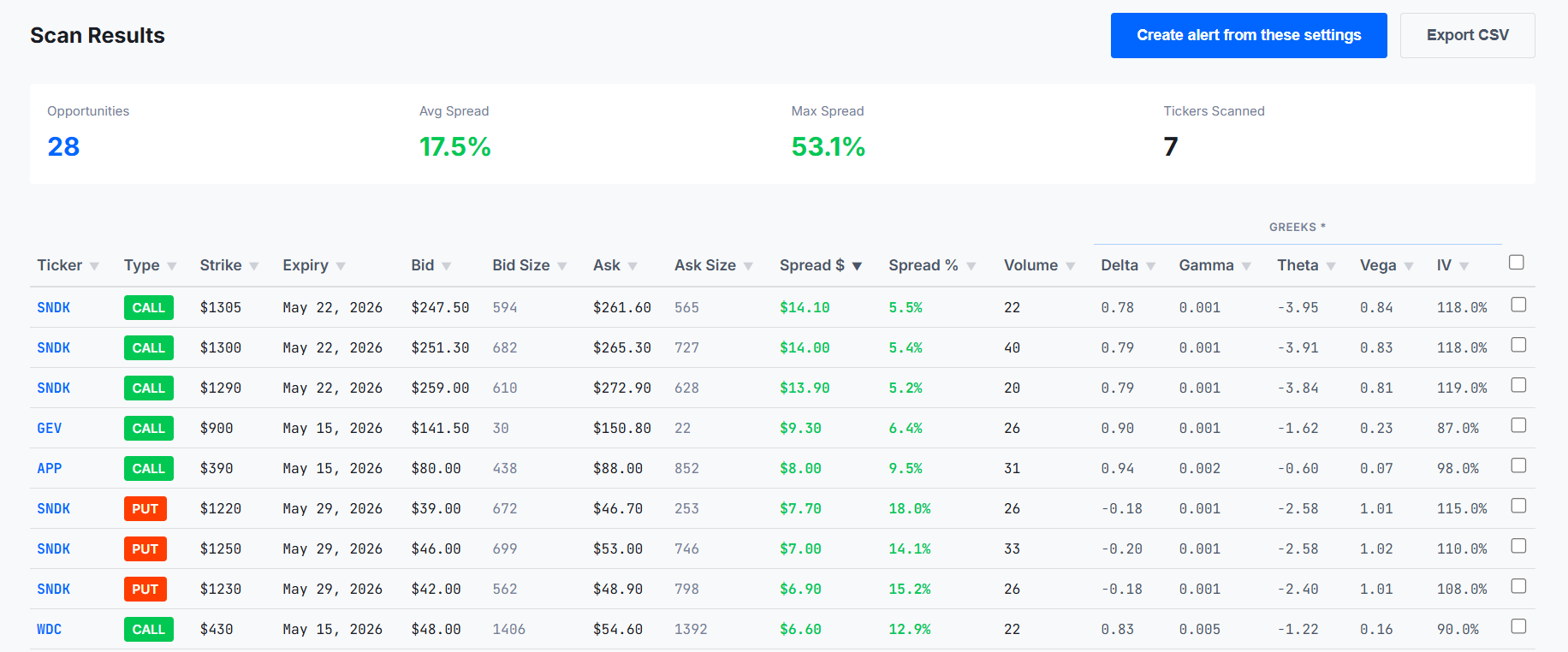
Sample scan output: 28 results across 7 tickers, sorted by Spread $. May 8, 2026.
4. Export, Monitor, or Use the Data Independently
Export scan results to CSV to build a structured dataset over time, and configure real-time alerts to monitor spread conditions continuously. You can also incorporate Spreadsearch measurements into your own trading analysis. If you choose to trade a contract identified in a scan, execution takes place independently through Trader Workstation. Spreadsearch never touches your money or executes trades. Trading decisions and execution remain entirely under your control, through your own Interactive Brokers account.
Who Spreadsearch Is For
Spreadsearch is designed for traders and researchers working with options bid-ask spread data. Some traders use spread measurements as one input when evaluating limit-order execution inside a wide spread. In less liquid contracts, available size, partial-fill risk, and potential market impact remain important execution considerations.
Spreadsearch can also be used independently of any trading strategy, to observe, compare, and document spread behavior across contracts, expirations, strikes, and market conditions, including for research and educational purposes.
For a detailed breakdown of who will and won't benefit from Spreadsearch, see Who is Spreadsearch for?
Technology
Spreadsearch is built on the following foundations:
Desktop Application
The desktop app connects directly to your local Interactive Brokers Trader Workstation (TWS), ensuring fast, reliable access to real-time market data. All data stays on your computer. Spreadsearch never stores or transmits your trading information.
Parallel Processing
Spreadsearch uses parallel processing to analyze multiple contracts simultaneously, reducing scan times from minutes to seconds. Typical scan: 10-40 seconds depending on configuration.
Real-Time Alerts
Configure alerts to monitor spreads continuously. Receive desktop notifications when contracts matching your criteria appear, and review recent notifications from the app.